Showing posts with label Gadget Review. Show all posts

The DS8113 is a low-power, low-cost, smart card interface. This device performs level translation between a host microcontroller and a 5-, 3-, or 1.8-V smart card, while supplying up to 80 mA for smart card operation. The DS8113 features the industry’s lowest power stop mode, which allows applications to support smart card communication and draw only 10 nA while the card is inactive. Additionally, it provides ±8-kV ESD protection, thus protecting applications from damage during card insertion and removal. Designed to meet all ISO 7816, EMV(TM), and GSM 11.11 specifications, this robust smart card interface is ideal for financial terminals, set-top boxes, and other smart card reader applications.

The DS8113 is a replacement upgrade for devices with higher power consumption and no stop mode, such as the TDA8024 and the ST8024. This smart card interface allows designers to improve the performance of their applications with few or no changes to the existing hardware and relatively minor software modifications. Available in a lead-free, 28-pin SO package, the DS8113 operates over the –40° to 85°C extended temperature range.

reff: Circuit Cellar/ #215, Jun 2008


Less than a year after the iPhone first launched, all of the key issues I had with the device have been addressed. First and foremost, there is now an SDK which allows the development of native applications. And while Exchange integration would eventually have arrived from a third party, Apple decided to bite the bullet and deliver it out of the box. Along with that comes a variety of device management and security features which demonstrate that Apple is aggressively targeting the iPhone for the enterprise.

new features and capabilities In addition to providing a relatively robust SDK to develop rich, smart-client applications, Apple licensed Exchange ActiveSync from Microsoft to be able to provide the following features:

1. Push e-mail
2. Push contacts
3. Push calendar
4. Global Address List
5. Certificates and Identities
6. WPA2/802.1x
7. Enforced security policies
8. More VPN protocols
9. Device configuration
10. Remote wipe

it’s response
Enterprise IT organizations are always looking to leverage existing investments, and one of the greatest benefits of Windows Mobile has been out-of-the-box integration with Exchange Service. This has been one of the reasons that Windows Mobile has been gaining ground against BlackBerry, and now Apple has decided to leverage Microsoft’s momentum and license Exchange ActiveSync for the iPhone. This will allow the iPhone to offer some of the key benefits also provided by Windows Mobile using Exchange ActiveSync, not to mention the fact that iPhones will now integrate seamlessly into any organization that provides Exchange support for Windows Mobile. There will still be the many organizations with significant BlackBerry investments who will continue down that path because of the investments already made (including the firms running Lotus Notes who are not able to provide Windows Mobile support without a third-party product anyway), but if anything this will only accelerate the adoption of Exchange ActiveSync as the industry standard for mobile synchronization.

microsoft’s perspective
As someone who has spent the last decade focused entirely on building applications for Microsoft’s mobile platform (since Windows CE 1.0), I’m torn when I look under the hood and examine the pure economics of the situation. Microsoft’s profit (or loss) related to sales of Windows Mobile devices is minor compared to the enormous profits and incredible margins in the sales of server and client licenses for Windows and Exchange Servers. Given that, it is no surprise that the formal job description for those Microsoft employees who are out there selling
Windows Mobile specifically states to use “Windows Mobile devices to influence .NET Server sales related to mobility.” Given that context, it is absolutely no surprise that Microsoft chose to license Exchange ActiveSync to Apple for the iPhone. While it gives the iPhone significant competitive ammunition versus Windows Mobile, it actually accomplishes that by standardizing on back-end Microsoft server products, where Microsoft makes all of their money anyway. While I don’t believe for one second that Microsoft has given up on Windows Mobile, Apple has certainly raised the bar, and Microsoft will need to step up to the plate on a number of levels and execute a series of dramatic enhancements to their own platform.

the flipside
While the iPhone is a great device for the average consumer, it is not for everyone. For instance, the form-factor, touch-screen keyboard, and inability to swap batteries are serious downsides for some users. And while the SDK goes a long way in enhancing the platform, the iPhone development platform doesn’t come close to the richness of the ecosystem around Visual Studio and the .NET Compact Framework. Given the fact that Apple must approve all iPhone applications, and with all distribution going through iTunes, there are many software developers and enterprises alike that will not necessarily appreciate these requirements. Additionally, there still is no support for products like SQL Server Compact or System Center Mobile Device Manager, which are significant challenges primarily for enterprise organizations. Although security is dramatically improved, there still is not yet the flexibility provided by other platforms.

my views
While the iPhone still isn’t perfect, it has reached a level of maturity where IT organizations, small and large alike, need to place the iPhone on their radar if they haven’t already. This is good news for Apple and great news for Microsoft. As twisted as it seems, an alliance between
Apple and Microsoft on Exchange ActiveSync will only increase profits for both companies, as they are now perfectly positioned to steal market share from BlackBerry as the next enterprise deployment cycle rolls around.
My final thought is to make sure you don’t forget Windows Mobile. Unlike the iPhone, it’s not just a smartphone; it’s a robust platform for enterprise applications. In fact, it’s the mobile platform that Apple uses in their retail stores to process sales of iPhones, using Windows Mobile-powered Symbol/Motorola handhelds.
In the end, if iPhone sales go up, Microsoft makes money on the Exchange Server licenses. If they go down, Microsoft makes money on Windows Mobile.
Not a bad arrangement!

By : Nathan Clevenger @ smartphone & pocket pc magazine, Jun/Jul 08


Sprint’s new Samsung ACE is a more powerful version of the BlackJack II.

Sprint is now offering the new Samsung ACE, a souped-up and slightly redesigned version of Samsung’s second generation BlackJack smartphone. From the front of the device, it’s a little difficult to tell the ACE and BlackJack II apart. But there’s a world of difference under the hood.


slim, sleek world phone
The ACE is a true world phone, with CDMA and GSM network capability. In the U.S. it connects to Sprint’s CDMA network. Outside the U.S. you can slip a SIM card into a slot under the battery and use it on almost any international wireless network. The ACE is a small and attractive Windows Mobile Standard device that’s easy to carry around with you in your pocket or purse. Like many other Windows Mobile smartphones these days, it has a QWERTY thumb keyboard below the display. What sets the ACE apart from its competitors is its very thin, sleek profile. Ergonomically designed for one-handed operation, I found the device very comfortable to use as a phone and data device. Its candy bar form factor, 5-way navigation button, and thumb wheel make it perfect for onehanded operation. Other features include Bluetooth 2.0, push e-mail capabilities, and good call quality. For wireless connectivity, the ACE runs on Sprint’s fast EVDO Rev. 0 and 1XRTT network. At the time of this review, there was no upgrade path to the faster EVDO Rev. A network. Globetrotters should be aware: while roaming abroad, you will be deploying the slower GPRS network.

more power; better user experience
Astute cellular shoppers will notice that the Sprint ACE bears a striking resemblance to AT&T’s BlackJack II. They’re essentially the same device with cosmetic and internal changes. Sprint customers will also enjoy a faster processor than its AT&T brother has. The ACE uses Qualcomm’s 312 MHz processor instead of the BJ II’s 260 MHz TI chip. This additional speed helps the ACE do an adequate job as a tiny road warrior. The ACE’s body is also thinner than the BJ II, making it easier to hold, especially if you have small hands. The 2.3-inch screen is well suited for watching Sprint TV, one of my favorite Sprint features. The ACE’s controls consist of two soft keys, a shortcut to the Today or Home screen, a Back button, Talk and End keys, and a square four-way directional D-pad with a select button situated in the middle. The BJ II’s rounded four-way D-pad is slippery and less comfortable to use than the ACE’s. The left and right soft keys “toggle” with the Home and Back key using a concave curve, giving the user the illusion and feel of two separate keys. The D-pad, in between the two “togglers,” is slightly elevated and has more space for scrolling up, down, left, and right without inadvertently activating the surrounding buttons. A microSD expansion slot is located on the upper-right side and is protected by an attached cover. Immediately below the microSD slot is a thumbwheel, which can be pressed to select items, and a second Back button below it. The thumbwheel makes it easy to scroll up and down when reading long documents or surfing the Web. Having the Back button near the thumbwheel lets you quickly escape from the current menu or applications. This combination of the thumbwheel and Back button enhances the one-handed experience. In addition, if you firmly hold down the thumbwheel for a few seconds, it brings up a “quick launcher.” This convenient feature lets you open several applications including the Alarm, Task Manager, Calendar, and Edit features. The Edit features allow users to program applications into this cool additional Thumbwheel feature. In addition, when you press and hold the side “Back” button, it activates the camera. The keys on the full QWERTY keyboard are slightly peaked in the center (like a roof), which makes text entry an easier and more enjoyable experience. The backlit keys make the device well suited for typing in dark or dim areas. The keys are a bit crowded, however, making it more difficult to type if your thumbs are larger than average.
The number buttons are placed in rows 3, 4, & 5 and stand out against the non-numeric black keys due to their gray color. The function key acts as a “NUM Lock” for multiple numeric entries. The left side of the ACE contains the rocker volume control and covered power/USB sync/headphone adapter. Unfortunately, Samsung has included yet another proprietary adaptor port. I truly wish there could be industry standardization when it comes to power, sync, and charging adaptors. At least the ACE will charge when connected to the USB port of a computer.
On the back of the ACE there is a 1.3 MP camera/camcorder (sans flash), speaker, and removable, replaceable battery. An additional extended battery is available as an optional accessory.

Windows mobile and sprint applications
The Sprint/Samsung ACE ships with the Windows Mobile 6 Standard OS and software suite built in and ready to use. The applications include Mobile Outlook (Calendar, Contacts, Messaging/Inbox), Mobile Office (Word, Excel, PowerPoint), Media Player Mobile, Pictures & Videos, complete description of this software is found in the At A Glance section of the magazine on page 78. In addition, the ACE comes with Sprint’s Power Vision applications a great addition to the device that includes Sprint TV. This gives you news, sports, weather, and entertainment, including full TV episodes at an additional cost. Other Power Vision features give users access to news headlines, sports scores, and much more on the fly. The ACE’s crisp, bright screen and high-speed EVDO network give viewers a worthwhile media experience. In addition, software can be downloaded directly to the ACE by clicking the “Sprint Software Store” icon which links to Handmark’s mobile Web store. Customers can find, download, and buy software, games, ring tones, graphics, and other Windows Mobile applications simply and securely. Additional titles are available for the desktop PC at softwarestore.sprint.com. Wireless e-mail is available from multiple corporate and personal e-mail accounts, including POP3 and IMAP. Users can also set up wireless access to Microsoft Outlook e-mail with a direct connection to Microsoft Exchange Server 2003. File Viewer allows viewing of MS Word, Excel, and PowerPoint documents. The Text Messaging Enabled feature allows you to send and receive text
messages across the room or across the country.

Should it be your AcE?
If you need a world phone with high-speed data while in the States, and you are looking for a solid, sleek smartphone, the ACE may just be your perfect upgrade. While partial to touch screen devices, this is the first Windows Mobile Standard device I have used that is truly a one-handed device. The improved button design and the ergonomic QWERTY keyboard are more reasons to add Sprint’s ACE to your short list of global phones.

By : Edward Zabrek, M.D.


Microsoft has announced plans to collaborate with RFID vendor Sirit
to implement near field communications (NFC) to Windows Mobile.
This “proximity technology” will provide “contactless” payment, secure
access, control of home entertainment systems, and other features
to Windows Mobile devices. NFC technology is already used widely in
Japan, where commuters can purchase train tickets or pay for parking
by waving their phones in front of sensors. A report on NFC conducted
by ABI Research projects that 30 percent of all phones worldwide will
incorporate NFC technology by 2011.

Soucer : smart phone & pocket pc jun/jul 2008


Buying a cell phone is more than a matter of choosing a handset--you also have to pick a service provider, or carrier, as well. Each carrier in the United States offers s different selection of technologies and services, so it's important to think about your needs when making a choice. For that reason, selecting a carrier should be the first step in the cell phone buying process.

Twisting technology

Wireless carriers in the United States operate over two different networks: Code Division Multiple Access (CDMA) and Global System for Mobile Communication (GSM). Though each technology transmits voice and data, they do so in different ways, which makes them incompatible. As a result, you can't take a CDMA phone and use it on GSM or vice versa.
Of the U.S. carriers, AT&T (formerly Cingular) and T-Mobile use GSM while Sprint, Verizon, and smaller carriers such as Alltel and U.S. Cellular use CDMA. Though Nextel is now part of Sprint, Nextel-branded phones use a third technology called iDEN, or Integrated Digital Enhanced Network.

Each technology offers distinct advantages. Generally speaking, CDMA coverage is more widespread in the United States, especially in rural areas (though this won't be true forever), and many argue that CDMA offers better voice quality. On the other hand, GSM service has a larger global footprint (it's the standard in Europe, for example) and GSM phones use the convenient SIM cards, which you allow you to, among other things, switch phones more easily. Also, when taken on a global scale, GSM users will find a wider selection of handsets.

With that in mind, if you travel overseas frequently or you enjoy switching out your phone often for the newest model available, then GSM is the better choice. Not all GSM phones will work overseas, however, so be sure to read CNET's Quick guide to world phones. But if you'll be making calls mostly in the United States or you're eager for a choice of 3G services (see CNET's Quick guide to 3G for more information), then CDMA is an equally good option. What's more, some CDMA phones now also support GSM networks for international use.
Besides technology, there are other factors that should play in your carrier decision. You should begin by deciding which carrier has the most economical service plans and the most attractive selection of phones. The quality of customer service is another determinant, but that can be difficult to evaluate beforehand. Since knowing the pros and cons of each operator isn't easy, we invite you to take a closer look at service providers in our Carrier comparison section. Besides the major operators, you might also consider MVNO carriers that cater to a special demographic or lifestyle. For example, Helio and Virgin Mobile are targeted toward younger users while Boost Mobile is centered on urban users who want advanced features.

Ultimately though, you should base your decision on which carrier offers the best reception in your area. Because evaluating wireless coverage requires experience with the network in a wide variety of physical locations, CNET does not rate wireless carriers. With that in mind, word of mouth is an essential tool when selecting a provider. Since reception varies sharply by location, ask your friends and family which carrier they use. Also, since there's no substitute for real-world experience, ask to borrow a friend's phone, and test it in your house and your workplace. Remember that carriers have a grace period during which you can test the service and return the phone without voiding the contract. Yet if you do return a phone and cancel a contract, you may have to pay for calls made during the usage period.


Frequent travelers, especially those traveling for business, are almost certain to carry laptop computers with them these days. In fact, Keynamics claims that a staggering 92 percent of business travelers carry laptops on airline flights, and with recently approved plans to offer inflight broadband Internet service, there’s even more incentive to get the laptop out and use it during the flight.

There’s just one problem: airline seats and tray tables, especially in economy class, are awfully cramped and inhospitable to the laptop computer.

Enter the Keynamics Aviator Laptop Stand, the second product from the company that brought the laptop world the brilliant but awkwardly named Laptop Stand on Wheels.

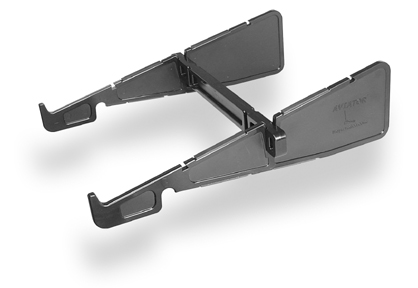
The Aviator is a three-piece plastic and rubber affair that fits together in two configurations: flat for packing and locked upright as a stand for computing. Its ability to collapse into a flat package makes for easy transport: just slide it into a side pocket in your computer case and you’re all set.

As a stand, the Aviator works fairly well. In fact, it might be the most versatile stand I’ve used, a jack of many trades and master of one in particular: nothing beats it for use on an airliner’s tray table. Perhaps the closest overall competitor is the CoolPad line from RoadTools, but the Aviator beats both the CoolPads hands down when it comes to computing in a cramped airplane seat.

The Aviator really gets the laptop at a comfortable, elbows-in typing angle, which is important if you get stuck in a middle seat in coach with well-fed seatmates on either side, as seems to be the case so often these days. Even if you’re in a window or aisle seat, or lucky enough to be in business or first class, the Aviator really improves the typing experience. The relative position of most airline tray tables really lends itself to the Aviator’s overhanging stance, and about the only way airborne computing could get more comfortable is if you had an actual desk to use.

According to Keynamics, the angle and offset positioning offer protection from a sudden reclining of the seat in front of you. I can’t attest to the severity of this perceived hazard, but the Aviator does seem to allow for less impact to the screen in such cases than might otherwise occur. Whether you’re using a stand or not, however, if the passenger in front of you reclines his seat, you’re pretty much done using your laptop unless your arms are disproportionately short, like a tyrannosaurus rex.

Keynamics also advertises the Aviator as a desk stand, a role in which it is competent, though not excellent. Like Keynamics’ dedicated desk stand, the Laptop Stand on Wheels, the Aviator hangs the laptop off the front edge of the desk at a very comfortable typing angle. It can also be used entirely on the desk, though some of its ergonomic benefit is lost if you choose to do so.

The only major drawback of the Aviator on a tray table—or on a desk—is its front retaining hooks, which prevent the laptop from experiencing a gravitational fatal attraction to the floor. Like those on the ill-designed Contour NoteRiser, they block the optical drive slot on many Mac laptops—the MacBook line, with its side-loading optical drive, is the major exception—but unlike the NoteRiser, the Aviator allows the laptop to be lifted easily to gain access. Most people don’t swap optical media in and out very often during a single flight, so this probably won’t bother you too much.

My final minor complaint is with the security of the assembly. The plastic seems robust and slides together easily, but it slides apart just as easily. This can cause the stand to fall apart if you pick it up from one side. This isn’t a big deal as long as you remember to use both hands when moving the Aviator and computer as a unit, but it would be nice if the stand could lock into its configuration or fit together more tightly.

There isn’t a lot of quality competition at the low end of the laptop-stand market, especially when it comes to portable or quasi-portable stands. The Aviator really, uh, “stands” out as an excellent value and a truly functional product with only minor flaws. It’s more portable than its competition and much more suited to inflight use. Keynamics has done it again.


How to Choose the Correct LCD Monitor
When choosing any LCD monitors, here are some features to compare. Use this guide line to compare the picture quality with price.

Brightness - The measure of how much light a panel can produce is measured in candelas per meter squared (cd/m²), also known as nits. LCDs usually run from 250 to 300 nits. HDTVs go up to 500 or more nits.

Pixel Pitch - The distance between like-colored pixels in the display. The closer the pixels, the sharper the image.

Response Time - This measures how fast the image is redrawn on the LCD screen measured in milliseconds (ms). The smaller the number, the better.

Contrast Ratio - This is the difference between the darkest black and the brightest white. The larger the ratio, the better.

Resolution - Make sure the LCD has a native resolution that matches your video card. The native resolution of an LCD is an important because if the LCD has to


Ready to get your life in order? Then maybe it's time to get a personal digital assistant. These small, lightweight devices can keep track of your appointments, phone numbers, and to-do lists, usually syncing with Microsoft Outlook or other desktop organizer software. Today's PDAs can also keep you amused with games, music, and video; a growing number have built-in cameras, and a few newer ones integrate GPS receivers as well. Even entry-level PDAs now have color screens, and all but the most inexpensive models also let you track e-mail, browse the Web, and send instant or text messages via built-in wireless Internet connectivity--Bluetooth (for connecting via a Bluetooth cell phone), Wi-Fi, and/or (in the case of PDA-phone hybrids) cellular networks. At the high end, a couple of models support two or three modes of wireless connection, so you can enjoy broadband speeds at Wi-Fi hotspots and increasingly speedy cellular hookups almost anyplace else.

The Big Picture
PDAs range from simple, unconnected devices designed primarily to replace pocket address books and calendars to powerful devices with lots of memory, wireless connectivity, integrated cameras and keyboards, and graphics muscle for playing music and video. Here, we'll discuss the main issues you need to think about, such as PDA operating systems and how much memory you need.

The Specs Explained
We'll address the CPUs used in handhelds, screen resolution, and internal versus external memory--and tell you how important each feature is to your purchase.

PDA Shopping Tips
How much memory does your PDA need? What about the different operating systems? Find the answers to these questions and more in PC World's buying advice


The iPod Performace

Posted In: . By wito


iPod is one of the most successful consumer electronic products in history. It is the best selling mp3 / mp4 player in the market today. The combination of sound quality, sleek design and unique user interface, made the iPod a hit, causing an entire industry of accessories to emerge almost overnight.
The Apple Corporation first released the iPod on October 23, 2001.Presently we are now on the 5th generation of iPod.

The first generation - Mp3 player with mechanical scroll wheel and four buttons.
The second generation - It has touch-sensitive wheel, 10 GB and 20 GB hard drives.
The third generation - It has touch-sensitive bottoms and USB connectivity.
The fourth generation - It has click-wheel and only two hard disk version, 20 GB and 40 GB.
The fifth generation - Mp4 player with 60 GB memory storage and video capability.

iPod has won several awards ranging from engineering excellence, to most innovative audio product. Very often it receives favorable reviews on looks, designs and handling.
iPod was designed as an mp3 / mp4 player for people with an active lifestyle. It is compact, sturdy and lightweight enough to take with you wherever you go. It was designed to fit comfortably in the palm of your hand or to be carried into a pocket or purse for easy transportation.
It comes in many storage capacities from 512 MG to 80 GB. The amount of memory it can hold, depends on the model or on the compression rate of your songs.
As an mp3 player it was designed to provide the best quality sound. It has a powerful 60 MW amplifier so it can deliver audio as loud as you want. It also has a 20 MZ to 20 KHZ frequency response, which means you can hear distortion free music at the lowest pitches.
iPod built-in rechargeable battery provides between 8 to 20 hours of music playtime depending on your model. Using the appropriate stereo adapter your iPod will sound great on your home or car stereo system. All iPod`s come as standard with a non removable lithium rechargeable battery. The battery charge will last about 14 to 28 days without use. The lcd display shows the battery level on the upper right corner of the screen. You may charge your iPod by connecting it to an Apple iPod Power Adapter or connecting it to a USB port of a computer. A full charge takes approximately four hours while 80% charge will require at least one hour.
Apple has designed the iPod, as an mp3 player, to work with the iTunes media library software, which allows you to select your music on your computer and on your ipod. iTunes can automatically synchronize this mp3 player with specific playlists or with the entire content of a music library each time you connect your iPod to a host computer.
The first three generations of iPod used two ARM 7TDMI derived CPUs running at 90 MHZ, while later models have variable speed chips which run at a peak of 80 MHZ to save battery life. Another great feature of owning an iPod is the fact that someone can record a discussion and then post the audio file on the internet. This means people can download the file and listen to the file on their iPod. As an mp4 player, with iTunes 4.9, you can now browse and subscribe to podcasts at the iTunes Website. Podcasts are radio shows or other audio/video programs that are downloadable over the internet.
In order for you to be a more satisfied iPod customer, as to the usability and longer battery life spam of this mp3-mp4 player you should consider the following tips:

- Keep it turned off when not using it.
- Update to the latest software.
- Keep it at room temperature whenever possible.
- If you are not using the backlighting, turn it off.
-Turning off the equalizer will save you battery.
- Use compressed songs.

With the availability of compact audio format, we have had mp3 players such as iPod, which provided an unprecedented portability to eager electronic consumers. Now iPod, as mp4 players, is already able to deliver video capability and a whole new set of features and services yet to come.


The single most important reason anyone buys a notebook is for portability. This is something that you can take anywhere. If you frequently travel in your work, you need a notebook. If you are a student going back and forth to the university, you need a notebook. If you are journalist traveling the world and submitting articles, you need a notebook. And today's notebooks can be as powerful as most desktops with dual processors, large capacity internal drives, and other attractive features. But which one is right for you? How do you determine what type of notebook will fit your current needs plus allow you to expand for the future?
And the first part of the answer to the question of which one is right for you leads to a half-answer: "It depends." It depends on what you are going to do with the computer. Are you going to use it for work or recreation? Is it something needed for your profession or are you a hobbyist? Do you play a lot of games? What level of internet access do you need? It is also important to remember that unlike desktop models, notebook computers cannot be upgraded easily. In fact, they usually have no upgrade path so you should take the time to get exactly what you need in terms of features and performance.
One characteristic of a notebook computer one should consider is the screen size. If you need to be able to have a lot of landscape for projects you are working on then consider a wider screen. Screen sizes usually can range from 10.4 inches to 17.1 inches. If you do a lot of work on an airliner in economy class, you are probably better off with a smaller screen size (because of the reclining seatbacks in front of you). Also a smaller notebook is just easier and lighter to carry around. Some who do presentations with their notebook computers will benefit from larger screen sizes such as those that use the newer WXGA technology. WXGA notebook screens can achieve resolutions up to 1366 by 768 pixels.
Battery life in your notebook computer is very important too. If you move around quite a bit, you might want to consider buying a notebook with not only a long lasting battery (most go 2-3 hours), but also one where buying a spare battery is not very expensive. One very inexpensive solution for the battery problem is to buy an external universal battery that can last up to 3-4 hours.
Another feature you need to consider when buying a notebook is internet connectivity. You will find that a popular way for people to work these days is with a wifi-enabled notebook at a wireless hotspot (such as in coffee shops, restaurants, libraries and airports). If you are buying an older used notebook, you may have to get an additional wifi-card if you want to have the mobile connectivity provided by this technology. Also, you will find that most hotels nowadays offer high-speed internet access but it is usually through a wifi connection.
And lastly, you need to consider what other options you want for your notebook computer. Do you want a CD writer or will you need to record DVDs? Do you need premium sound? How large of a disk drive do you need? When it comes to disk space, CD/DVD writers, sound cards, memory, and processor speed, it's best to get it now as opposed to get it later. Here's why: The upgrade path for most laptops and notebooks is not very long. This is because notebooks are probably replaced every 2-3 years. They are quick becoming just as expendable as a set of tires for your car. And if you do not maximize on memory and processor speed, your notebook may not able run efficiently the new application and game software. The more your notebook is adaptable to software upgrades, the longer it will be an effective tool for you.


Alienware m9750 Notebook Review - SLI, RAID and Gaming on the Go
There are really just three types of notebook users in the world: those that want the most battery life, those that want a mix of battery life and performance and those that want portable computing powerhouses. Alienware has been an expert on the third type of system, even though they have attempted to offer some mid-range products as well. But let’s not kid ourselves – Alienware’s name is all about the niche market, for the user that has money and isn’t afraid to spend it.

Today we are looking at the Alienware m9750 notebook; a 17" screen beast that boasts more than a few features that your desktop probably doesn’t have. A dual-core Core 2 Duo processor, SLI graphics and RAID 0 SATA hard drives are the stand outs.

Let’s take a quick look at the system specifications, from the Alienware website:

On the inside, the Alienware m9750 is built on the Intel 945PM chipset paired with the ICH7M south bridge – an aging but potent chipset for notebook computers. It runs on DDR2 memory, speeds of 667 MHz only, but it does have two accessible memory slots. Both the DX9-based GeForce 7950 and the DX10-based GeForce 8700M GPUs are available in SLI configurations.

Two SATA bays allow for a single or dual hard drive configuration and even the faster 7200 RPM 2.5” drives are an option for an upgraded price. Networking is powered by an Intel PRO Wireless 802.11 a/b/g card, includes Bluetooth support and has an integrated Gigabit networking connection.

The LCD itself, which we’ll see on the next page, is available in either a 1920x1200 or 1440x1900 resolutions, but only the high end option comes with the high contrast “Clearview” technology that I have come to enjoy.


Nokia's Internet Tablet line has always suffered from a bit of an identity crisis. Though these mobile internet devices, or MIDs, mostly delivered on the promise of mobile Web browsing, their lack of PIM tools, lukewarm media playback, and inability to sync with PCs pretty much boxed them off from any mainstream appeal. With its built-in keyboard, enhanced Web browsing, much-improved user interface, and customizable,Linux-based Maemo platform, the $479 Nokia N810 is easily the company's best MID to date. Without question, this device offers a superb mobile Internet experience, but the absence of productivity tools and mobile broadband may drive away its prospective audience.

At 2.8x5x0.6 inches and 8 ounces, the sleek-looking, silver N810 feels more solid in the hand than its predecessor, the N800. Nokia carried over many of the N800's design staples, including the sprawling 4.1-inch, 800x480-resolution touch-screen display, built-in stereo speakers, 3.5-inch headphone jack, integrated VGA Webcam, and pop-out kickstand.

One of the biggest improvements is the N810's inclusion of a hardware keyboard. Where the N800 and N770 offered only the touch-screen variety, the N810 features a slide-out, backlit, full-QWERTY model. Compared to the bubble-shaped keys found on many smartphones, the N810's flat keys can be awkward to type on, and the overall spacing is a bit cramped. Still, anyone who has experience with a Blackberry should feel right at home with this setup.

The N810 does have a few design quirks worth noting. For one, the device does not accept standard SD cards—only the smaller miniSD variety (or microSD with an adapter). Nokia also did away with the N800's dual external and internal media card slots, opting instead for a single slot on the bottom of the N810. Another quibble: In place of the N800's rotatable Webcam, the N810 has an embedded fixed lens on its face. This change shouldn't affect video Web conferencing (just prop the device up on its kickstand and shoot), but to take pictures, you have to flip the N810 around and snap shots blindly—not an ideal solution.

Though the N810 won't dethrone the iPod Touch in the looks department, it does give Apple a run for its money in terms of user interface. The N810 operates on the latest upgrade to its custom Maemo operating system, OS 2008. The platform is Linux-based, which may frighten and perplex some users, but rest assured, the user interface will satisfy Linux lovers and ordinary folks alike. On the left side of the screen, you have Web, Chat, and Application icons. Clicking on these icons will bring up a menu with several options (clicking Web allows you to open a new browser or select from bookmarks, for example). Along the top toolbar are icons for Wi-Fi, Bluetooth, battery, sound and brightness (a GPS icon will also appear when the radio is in use). The home screen offers far more customization than the previous OS 2007. Using the home menu, you can alter your wallpaper and set various interfaces (like a Google search bar or a media controller) that can be dragged around the screen.

Clicking on the Application Launcher icon will bring up a list of pre-installed programs, including Skype, Rhapsody, WayFarer GPS navigation, games like Mahjong and Marbles, Media Player, PDF reader, and more. To add even more software, you can browse downloadable applications with the Application Manager. Some of our favorites include SCUMMVM, a PC game emulator; mplayer for DivX video playback; and Pidgin (formerly GAIM), an incredibly robust, multiservice instant messaging client. Average users who prefer to have just a few do-it-all applications will likely be overwhelmed by the dizzying number of options available on the N810 (for these users, we recommend the iPod Touch), but techies who delight in learning and tweaking new apps and programs will love the N810's platform.

Simply put, Web browsing on the N810 is a joy. The Maemo team took extra care in implementing OS 2008's Web capabilities, providing increased support for AJAX, Java, and Flash. In our tests, Web pages loaded quickly using the N810's 802.11 b/g Wi-Fi connection, and most formatted perfectly. The browser also did a superb job loading a variety of Web apps, including AJAX-based Google Mail, Docs and Maps; streaming video on YouTube and Break.com; music-streaming with last.fm; instant messaging apps like Meebo.com; and Myspace and Facebook social networking sites. The browser also handled Java and Flash admirably, although some sites, like Yahoo's new Java-based Mail client and the Slacker music streamer, failed to load properly.

In addition to its excellent Web browser, the N810 offers a number of standalone applications for Internet-based communication. The default Chat application works as advertised, although you can only use it to access your Google Talk, Jabber, and SIP instant messaging accounts. (For IM, Pidgin is a far superior alternative, as it syncs with AIM, Bonjour, ICQ, IRC, MSN and more.) The N810's e-mail client is barebones and suffers from slowdown with IMAP e-mail accounts, as did previous versions. (Unfortunately, we couldn't track down a better alternative.) In our tests, we were able to initiate and receive crystal clear Voice over Internet Protocol (VoIP) calls using Skype, though as of press time, Skype had not implemented video conferencing for the N810, a glaring omission we hope will be added soon. We also wish that Nokia had included a built-in WWAN radio for tapping into Verizon or Sprint's EV-DO mobile broadband network, or the even-speedier High-Speed Downlink Packet Access (HSDPA) protocol, so users can check e-mail and browse the Web in the absence of a Wi-Fi signal.

The bundled WayFarer GPS software was mostly on par with what you would get in a standalone GPS unit from Mio or TomTom. Our one complaint with the software was that it doesn't give you many reroute options other than selecting the shortest/fastest route and rearranging the order of the roads you were taking. Another downer: the GPS receiver took up to 10 minutes to lock onto a satellite signal each time we tried using it. The biggest catch, though, is the extra price: you have to cough up $129.99 for a three-year license in order to use the GPS software past its seven-day trial. If you don't want to spend the money, you can use a free Maemo Mapper download, although in our experience, that app is functional but extremely stripped down. It's also hamstrung in that you need to have Wi-Fi access in order to download route data when punching in your destination. In short, the N810 isn't meant to replace your standalone GPS device, but it could be a neat add-on for other applications like GPS tagging of your photos.

Media playback on the N810 was iffy. Nokia's default media player supports a good mix of audio formats, including MP3, WMA, AAC, AMR, AWB, M4A, MP2, RA (RealAudio), and WAV. The integrated stereo speakers sounded crisp and powerful, as did our wired headphones plugged into the standard jack. (You can't currently use your stereo Bluetooth headphones to listen to music.) The N810 also has a built-in Rhapsody app for streaming music and downloading album art from the Web. Playlist support was decent, although we found the media player playlist editor very unintuitive.

As for video, the N810 supports even more file types than the top portable video players (PVPs) we've seen, like the Archos 605 WiFi. The device can play back 3GP, AVI, WMV, MP4, H.263, H.264, MPEG-1, MPEG-4, RV (RealVideo). In testing, however, we found some videos, particularly DivX, Xvid and H.264 encoded files, suffered severe stutter, either both windowed and full-screen mode, while others would not play at all on the included media player. Luckily, having access to other applications offers versatility in how you play your video, though it's too bad that there isn't one solution that works for everything.

The one area that Nokia apparently completely overlooked on the N810 is productivity. The big criticisms with the N770 and N800 were their lack of PIM applications, and the N810 unfortunately follows in that trend. The device eschews indispensable tools like a calendar, scheduler, document editor, and spreadsheet viewer—apps that, in addition to their convenience for business users, would make great use of the device's spacious screen. You do get a PDF reader and the aforementioned e-mail client, but beyond that, corporate types are pretty much out of luck until a Linux guru ports the OpenOffice suite over to Maemo.

This omission is truly a shame considering that, since the N810 performs so well as an Internet portal, the right PIM tools would likely make it a road warrior's dream. That said, it's understandable that, given the recent trend toward Web-based programs like Google Apps, Nokia's development team focused more on OS 2008's Web performance instead of adding productivity apps. But until Google really nails its online productivity suite, we're aching for the Linux community to come up with a downloadable productivity solution for the N810.

In the end, like its predecessors, the N810 still lacks the productivity prowess and wireless broadband support it needs to attract business users. And considering its $479 price, we expect features like the device's integrated camera, video playback, and GPS to work better than what we saw in our tests. But overall, we're very impressed with this Mobile Internet Device. Its upgraded Web browsing capabilities, customizable development platform, and hardware keyboard make it a solid choice for techies that can't bear to leave the Web at home.

Performance N810 Internet Tablet

[+]

Excellent Web browsing; improved user interface; includes built-in QWERTY keyboard, GPS receiver; Linux-based Maemo OS 2008 offers a wide variety of downloadable applications and customization options; lots of media file support

[-]

Does not support SD cards; fixed-lens Webcam is not ideal for taking pictures; stripped-down e-mail client; GPS software requires $129 license; jerky video playback for some file types; no solid, do-it-all media software; lacks productivity tools

related


What Is Mp4 Player

Posted In: . By wito

Mp4 Tutorials..

Mp3 audio format became available back in 1993. Shortly after it became the standard internet audio format, and it is still very much used world wide. Recently another format has been introduced, the mp4 audio-video format which allows video capability, so that users can watch movies, TV shows, music videos along with mp3 songs.
As the industry of mp4 player devices evolved, more features such as fm tuner, voice recorder, email, internet browser capability and others were added to mp4 devices, making them a desired product among electronic users.
Differences between mp4 and mp3 format, relies basically that mp4 devices holdPublish Posts both audio and video files. As for the mp3 it only holds the audio type file. So, one could think of mp4 as being the next step in this evolution file format that started with mp3.
Due to the capability of delivering audio and video at the same time, mp4 devices can offer a wide range of interesting features, such as web browsing, email, instant messaging, video and music download, bluetooth wireless technology, digital camera and others. Also game capability and multiple language options are features that made mp4 devices so popular. Other features, such as voice recording, enabled mp4 devices to be used for professional purposes, besides entertainment.
Another important mp4 feature is the storage capacity, that can start from 256 mega bites up to 40, 60 and up giga bites. Usually a small hard disk unit is used to hold several giga bites of data. For smaller storages, an internal electronic flash memory may be used.
As a music player device, mp4 may offer a 7-band equalizer which will allow the user to change the sound category according to the music style. These sound categories are Pop, Jazz, Rock, Soft, Classic and DBB. Also mp4 player device will support various format files such as Mp3, AMV, ASF, WAV, WMA, WMV and others. As far as the supporting video formats are concerned this device proves to be able to convert file in the AVI, MPEG, Windows media format into the AMV thru the use of software.
Since mp4 devices is compact, it is safe to say that its small size, light weight and good user interface menu, make this device portable, easy to control and access no matter where one can be. As mp4 format became more popular, several internet audio-video download sites started to offer services, so that mp4 users can download their favorite music or video at affordable prices. There are sites that offer music file download for only 99 cents each, and one has to only pick his favorite song, not the entire album.
Also available in these internet sites are files called Podcasts, which includes information programs, news broadcasts, comedy and entertainment programs. Podcasting is quickly becoming a buzz word among the techie crowd. So what is podcasting, anyway? Podcasting is online audio and video content that is delivered via an RSS feed. Although Podcasting is new, it should become a mainstream communication medium in the near future.
Being basically a container, mp4 player devices are able to provide multimedia solutions with its audio-video file format. Because of that mp4 players became very popular and as it becomes more sophisticated with new features being added in new models, people become more eager to own these device players. After all most electronic consumers do have a wish to keep up with modern time.


Did you by the iPhone before the rumored Q1 ‘08 release of the iPhone with GPS and much more? Well, if you’re sick of holding your breath, or just need directions ASAP, then a quick drive down loco (as in crazy in Spanish) lane will assist you on your merry ole way. How so you ask? Well, Aving’s got the scoop and it’s the Loco GPS. It’ll launch February ‘08, cost $89 and expect the eagerly lost to knock down local Apple stores to nab one. I can already hear the toilet flushing on my iPhone’s battery life. Oh well, at least I’ll be able to find a place to stop and charge it.
Note: You’ll need to hack (i.e. Jailbreak) your phone to get it to work. WEAK!


Nokia E90 communicator name indicates it is cell phone which is mainly used for communication in all level. Nokia E90 is quad band 3G cell phone. Nokia E90 communicator weighing is 210 grams. This cell phone has a integrated GPS. This GPS phone allow user to locate their favorite places using map application.

The Nokia E90 is flip type phone. This cell phone is a ultra modern cell phone. With this cell phone user can easily download their photos. This cell phone has a integrated handsfree battery. This cell phone has a Bluetooth, USB, EDGE facility. So the user can easily connect with others through wireless technology.

Nokia E90 Communicator : Nokia E90 Communicator is a good communicator. The Nokia E90 Communicator phone is a music phone. Nokia E90 is a Smartphone. Nokia E90 Communicator phone comes with a XHTML Web browser. The phone comes with a push to talk feature. The E90 Communicator is the ideal companion for all business.

A member (aboveconnection) over at Howardforums has posted lots of live pics and a hands on video of the phone. This phone still impresses me everytime I see it. It has almost everything I would want in one phone. Anyways, enjoy.


Play, relax, and entertain on the go with
shock-proof design. At 7 and weighing only 2lbs, you can take the Eee
PC anywhere. Bumps and shocks are no longer issues. With a dependable
solid-state disk, you get unparalleled shock-protection and
reliability. Power-efficient design provides longer operating time when
on the go. With a rapid start-up time that takes only 15secs to boot,
the Eee PC is always ready to get into action. No technical manual
required with the specially designed, User-friendly and intuitive
graphic interface. You're always connected with built-in WiFi 802.11
b/g that automatically detects and connects to the Internet at any
hotspot. The Eee PC includes the documents and the e-mails software,
and a suite of other Productivity software to help keep you on track.
Upload photos and videos and share them instantly on Flickr or YouTube
without waiting till you get home. Enjoy Music and videos with
extensive support for a wide range of Digital multimedia. Log on to
Skype or other network, and you can connect with friends anywhere,
anytime. Clear up wire clutter with the built-in speakers, and
microphone. Since it's so easy to use and durable this makes a perfect
gift for children, elderly or as a second lightweight notebook.

Processor Type : Mobile
Memory Size : 512 MB
Hard Drive Size : 2GB
Display Size : 7"
Weight : 2 lbs
UPC :
884840192206


HP’s IPAQ hw6515 is an innovation in a communicator’s arena because of its slim casing. A communicator has never been so thin and sleek but its main attraction is not slimness but a thumbboard. The phone is totally opposite to what its predecessors looked like, iPAQ hw6300 series, with 118 x 71 x 21 millimeter casing and 165 grams weight you will doubt it of being a communicator. Bu this baby has all the qualities. Lets see the first thing that strike you is its 65K colour touch screen with its 240 x 240 pixel resolution, marking the very first Windows Mobile based device with a square screen to hit shelves. And have no doubt as it is bright, clear and with adequate ClearType performance. On the upper right corner of the casing place has been made for the power on/off button alongside to unobtrusive alert LEDs. Right below the screen there is a five-way navigational pad just flanked by dual-purpose, mappable hard and rather very small buttons for opening the contacts and e-mail applications. These are followed by large and comfortable call and end telephony hard buttons on either side, and in the upper right corner resides the power on/off button alongside to unobtrusive alert LEDs. The HPiPAQ hw6515 features an integrated thumbboard, EDGE, Bluetooth and GPS. But don’t expect much from the thumbboard , it seems that HP has put it there for the sake of proving their point that it can be done but its not at all comfortable.

Some of the buttons positions have been changed to make it uncomfortable and they are again very small to operate. It is quite possible and we think that it will happen often that the user of the HPiPAQ hw6515 will press two commands at a time, all because of extra small buttons to fit in that ultra small and thin casing. The only control which is easy operate to operate is volume up/down rocker far up on the left side of the phone but its that easy that you can switch it on accidentally. The communicator is also laced with a 1.3 Megapixel camera, 1,200 mAh Lithium Ion battery integrated GPS receiver, an 312 MHz Intel PXA270 processor backed up by 44 MB of volatile memory and 12 MB of non-volatile memory, EDGE.


KIT N800 PORTABLE TABLET LINUX OS W/ V-MAT VIDEO MEMORY CARD

Linux
The NexTag shopping search engine has prices from name brand stores all
over the web. Compare prices for computers, electronics, books, CDs,
movies, office products and video games.

*
The Best Value designator is given to
the lowest price for an item in new condition from a highly rated
NexTag seller. To be highly rated, a NexTag Seller must have at least
10 reviews and an average of four or more stars.


The quad-band 3G Cocoon is not the first own-branded whiter than white handset I've seen from O2. That accolade went to the Ice. The Cocoon though, is a uniquely oddball mobile in several respects. It certainly looks different enough to be an eye catcher and apparently if you take your Cocoon to the O2 (formerly known as the Millennium Dome) in London, the phone knows what you are doing and will provide you with ‘exclusive content'.

O2's menu system is reasonably clear to follow. Up to eight shortcuts run along the bottom of the main screen and can be customised to show what you prefer, even pointing to individual browser bookmarks. The Cocoon can automatically change its wallpaper daily or hourly.

The Cocoon's curved white outer casing with its rounded top and bottom edges and black sides makes it look unlike any mobile I've ever seen. The casing is made of a plastic that has a semi rubbery feel that's quite nice in the hand, actually.

For all its unique looks the LED display is the real innovation of this handset. It has many functions. It can, for example tell you when you've got a text and show its first couple of words. It also shows who is trying to call you if they are in the device phone book, shows the time and provides battery low information. A series of five little icons light up when the LED is active to tell you if you've missed a call, got a voice message, switched to vibrate profile, set an alarm or need to recharge the battery.


Mobile - 512 MB RAM - 4 GB Hard Drive - 7" Display - Linux, Windows XP Home


Share photos of your travels without waiting
till you get home. Shop the world wide web without attaching any lines
or wires. Learn through the latest technology without a technical
manual. Play, relax, and entertain on the go with shock-proof design.
Connect with friends and family with just a few clicks with the ASUS
Eee PC 4G.